
AI Diss Track Generator with Lip-Sync Video
RapPrism’s diss track generator turns a fictional rebuttal and one or two photos into a short rap video with AI vocals and a beat.
Reference Clip
This diss track generator reference is a real Solo Booth freestyle sample, not a diss demo. Its original photo and topic appear alongside.
Actual input photos · AI-generated fictional adults
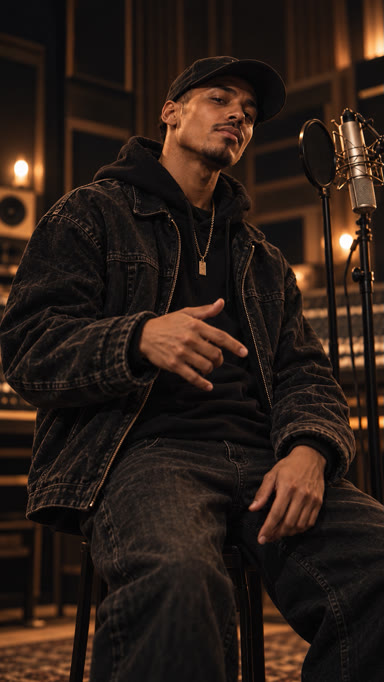
A confident freestyle-style self-introduction about turning small daily wins into big plans, with a clever closing punchline.
Choose a Fictional Position
The AI diss track generator combines permitted photos, English vocals, a beat and lip-sync video around a fictional position.
Use the AI diss track generator for imaginary captains, boastful game characters or luck debating practice.
Keep the AI diss track generator narrator consistent: choose one claim to answer, rather than a list of unrelated boasts.
How the Diss Track Generator Works
Invent the Rivalry
Give the AI diss track generator a fictional disagreement: strategy versus luck or rival imaginary teams. Use permitted adult portraits.
Write One Rebuttal
Feed the AI diss track generator one claim, answer and contrast. Enter a topic or lyrics; B answers A in Duo.
Check, Generate and Review
Check the AI diss track generator quote and submit once. After review, inspect words, faces and mouth movement before saving.
Make the Answer Understandable
Give the AI diss track generator a clear rebuttal before dramatic delivery: answer luck with hours of practice.
Read the AI diss track generator draft without music. One metaphor makes the final contrast easier to follow.
The AI diss track generator cannot make an unclear argument convincing through volume; remove background that needs lengthy explanation.
Diss Track Bars for a Fictional Rival
Try this diss track generator example: “You roll the dice, I put the hours in / You call it luck when preparation wins.”
These diss track generator bars are authored text, separate from the reference recording. Remove threats, real names and identifying details.
A diss track maker can stage imaginary captains debating maps and shortcuts. Give the diss track generator one concrete object per position.
A diss rap generator prompt needs an actual claim. Ask the diss track generator for practice answering luck with a worn-out training notebook.
Solo Statement or Two-Sided Battle
Choose the AI diss track generator in Solo for one narrator answering an imagined challenge, without switching sides.
Use the diss track generator in Duo for A’s claim and B’s rebuttal. Prepare separate authorized photos and balanced parts.
A diss track maker cannot promise precise handoffs. Inspect the diss track generator result for who delivers each line and whether the reply follows.
Keep the Rivalry Fictional
Keep the diss track generator focused on invented characters or harmless ideas, without identifiable real private targets.
Before using the diss track generator, agree on collaborative roles and portrait permissions; leave unresolved personal disputes offline.
Changing a name for the diss track generator does not fictionalize someone whose private details remain recognizable.
Write for the diss track generator as a staged argument, not a real allegation.
What the Reference Actually Shows
The diss track generator reference is a real Solo Booth freestyle performance, not a dedicated diss recording or these authored bars.
Judge each diss track generator result independently; the reference cannot prove exact voice identity or word-for-word delivery.
Inspect the diss track generator output for mouth movement and whether the fictional argument still makes sense.
Explain the Fiction When Sharing
Caption the diss track generator clip with its fictional premise. Do not tag unrelated people or present generated words as recorded statements.
Review the diss track generator output for unexpected threats or private references; the prompt does not guarantee the final meaning.
Withhold a diss track generator result that changes the argument rather than assuming viewers will understand the original intention.
Keep the diss track generator caption connected to the invented roles.
Choose the Point of View
- Solo (1 Image)
- The diss track generator in Solo carries one consistent rebuttal.
- AI Rap Duo (2 Images)
- The diss track generator in Duo stages fictional positions; match A/B photos and words.
Diss Track Maker Formats and Credits
The diss track generator supports 9:16 portrait or landscape, up to 15 seconds, and 480p, 720p or 1080p.
In the diss track generator, choose Natural or 3D Hip-Hop Anime; timing and dimensions may vary.
Check the diss track generator quote for duration and resolution. Matching Solo/Duo settings share a rate; one-time credits never expire.
A diss track generator output is commercially usable subject to necessary rights and permissions.
Save the diss track generator MP4 promptly after review. Records display for 7 days from creation; links may expire. Failed or timed-out charged tasks return actual credits.
Write the Next Fictional Exchange
Bring the AI diss track generator an invented rivalry and clear reply. This diss track maker is for fiction; friend jokes belong on the roast page.
Open the Diss Track GeneratorDiss Track Generator FAQ
Can the diss track generator target a real person?
Use the diss track generator for fiction or ideas. Avoid identifiable private targets; get explicit adult portrait and AI-use permission.
What should a diss track generator verse argue?
Give the diss track generator one claim and rebuttal: strategy versus luck, without threats or damaging personal claims.
Can the diss track generator stage two sides?
The diss track generator supports separate Duo photos and A/B parts. Let B answer A; check actual roles and timing.
Is the diss track generator reference a diss demo?
The diss track generator reference is real Solo Booth freestyle, not a diss demo. Its input is separate from these authored bars.
Is the diss track generator free?
A diss track generator video requires the quoted credits. Viewing the reference is free; separate writing does not pay for generation.
Does the diss track generator guarantee exact words and lip-sync?
The diss track generator can vary words, voices and mouth movement. Review fully; disliked completed work is not automatically failure.
Choose another photo performance: AI Rap Video Generator.