YOUR PHOTOS. YOUR BARS. YOUR MOMENT.
AI Freestyle Rap Video Generator
Turn one or two photos and a topic into a freestyle-style rap video with AI vocals and a beat. No lyrics needed: create a solo verse or trade bars with a friend. You can also write your own lines.
Examples are free to view. Video generation uses credits at the current quote.
AI-generated freestyle-style performances with new vocals and a beat. Not a live improvisation or a recreation of an existing song. Words, timing and likeness can vary.
See a Real Rap Performance from Photos
This existing Friendly Roast clip shows two reference photos brought into one rap performance, using submitted A/B lyrics, Playful Roast energy and a street scene. It demonstrates the shared generator; it was not made from one of the new Freestyle topic templates.
Original photos and submitted A/B lines
Photo A supplies the first performer; Photo B supplies the second. These are the public inputs used for this reviewed example. Read the submitted lines below, then play the actual output to compare the handoff.
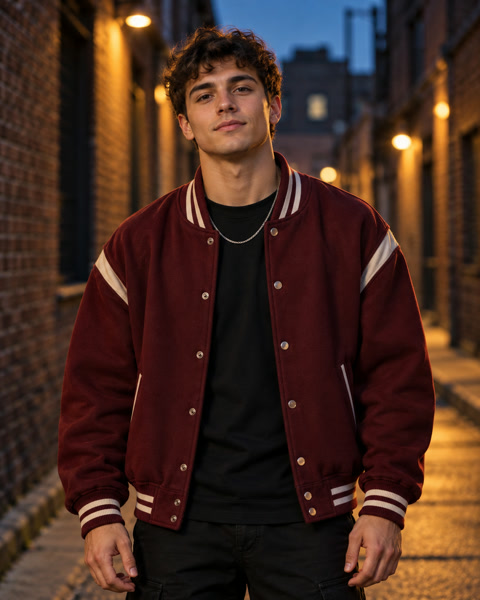
You talk big, but your moves run late; I hit the beat while you hesitate.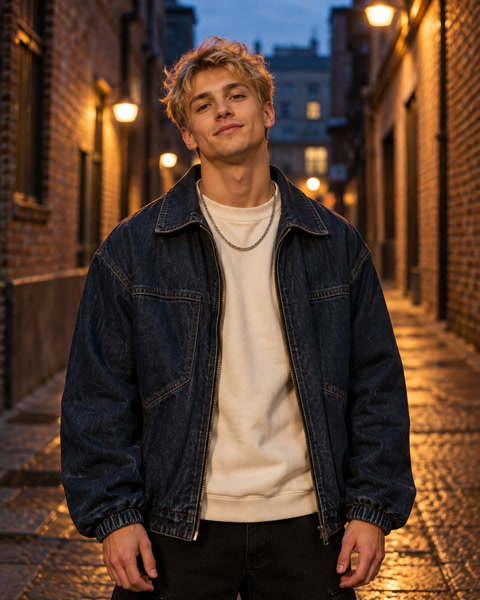
You missed that step, now watch me shine; your jokes fall flat, this groove is mine.A opens with a friendly boast; B answers that same challenge. This connected exchange is a useful way to structure your own battle. Submitted lines are guidance, not a verbatim transcript: listen for changes in wording, timing and who delivers each part.
The actual generated performance
Actual reviewed clip: 8.06s · custom-lyrics Duo
Loads the public script and setup only. Add your own authorized photos and confirm consent before generating; this button does not submit a render.
How to Make an AI Freestyle Rap Video
You can create here without returning to the homepage. Start with a short idea, then review the photos, writing and current quote together before submitting.
- 01
Choose Solo or Duo and add your photos
Sign in, choose one performer or two, and add one clear, authorized adult photo per person. Keep each face and mouth visible. In Duo, decide who will open as A and who will answer as B before assigning the photo slots.
- 02
Give the rap a topic—or your own lines
Describe one event and a tone, or load a starting idea below. For Duo, explain how B responds to A. If you already know the words, choose Custom lyrics and enter a short Solo verse or separate A/B parts. Edit the loaded text to make the story yours.
- 03
Check the credits, generate and download
Review duration, resolution, format and the displayed credit cost, then confirm your image and recording permissions. Submit once and follow the task status. After generation and safety review, watch with sound, check both turns and download the MP4 while it is available.
Start with a Topic—or Use Your Own Lyrics
A useful brief gives the performance something specific to say. Choose one everyday detail and one direction for the ending. Start with Theme when you have an idea; use Custom lyrics when you want to supply the starting lines yourself.
Theme: describe the idea
Write who is performing, what happened and how it should feel. The model creates English rap words together with the beat and video. You do not need a finished verse, but there is no separate lyric-draft preview before the video is generated.
Custom lyrics: supply the starting words
Enter one Solo verse, or put each performer’s lines in the matching A/B field. Use short phrases that sound natural aloud. The words guide the performance; the finished clip may change wording or delivery, so review the audio before sharing.
Who or what relationship + one specific event + a tone + how B responds.
A vague starting idea
Make a cool rap.
A more useful video brief
A confident freestyle-style self-introduction about turning small daily wins into big plans, with a clever closing punchline.A vague starting idea
Rap about my startup.
A more useful video brief
A solo freestyle about turning late-night coding into a product launch. Confident, playful English bars about coffee, fixing one stubborn bug and finally pressing publish. Keep one short verse and a hopeful closing rhyme.A vague starting idea
Two friends battle.
A more useful video brief
Two friends trade friendly English bars about cooking. A brags about instant noodles; B answers with the time A burned the toast. One short turn each, with a connected comeback and no cruel insults.A vague starting idea
Birthday freestyle.
A more useful video brief
Two longtime friends share a birthday freestyle in English. A recalls getting lost on a road trip; B answers with the laugh they still share today. One warm, playful line each and a short birthday wish.These are authored English creative ideas, not transcripts or render-tested results. Each loads an eight-second starting length. Delivery and lyric fit vary; shorten the idea or review the quote for a longer duration.
For an eight-second starting length, begin with one brief idea or one short turn per person. Read your lines aloud and cut extra names, lists and background stories. If the idea needs more room, check the quote for a longer duration. A character limit is an input limit, not a promise that every word will fit.
Explore topics and ready-to-edit prompt ideas ↗Solo Freestyle or a Two-Person Rap Battle
The difference is how the story moves, as well as how many photos you add. Choose a Solo point of view, a friendly challenge, or a shared beginning and ending. Each approach can start from a topic or your own lyrics.
Solo: one voice, one point
Use one photo for an introduction, a small achievement or a personal thought. Give the performer one attitude and one memorable detail. A clear final thought helps a short verse feel complete.
Story shape: a late night fixing one stubborn bug → the moment you finally publish → a confident closing thought.
Keep the focus on one performer’s perspective; several unrelated milestones can crowd a short clip.
Duo Battle: a setup and a comeback
Use two photos for a joke both people understand. A makes a light boast or playful challenge; B answers that same detail. Give both performers a turn so the result feels like an exchange.
Story shape: A boasts about instant noodles → B recalls A’s burned toast. Both turns stay on the cooking joke.
Keep the teasing friendly. Two separate boasts about different subjects will not explain how the performers should connect.
Shared Story: build the moment together
Use two photos to celebrate a shared memory, project or milestone. A introduces the effort or starting point; B adds what happened next. Both people contribute to the same outcome.
Story shape: A remembers training in the rain → B recalls crossing the marathon finish line together.
A shared story can work without a winner. Give each person one part of the memory and leave room for the ending.
In Custom lyrics, the first photo maps to the A field and the second to B. In Theme, describe those roles in the brief. Start with one short turn each and check the generated handoff; role assignment and timing can vary. The Duo guide explains the two-photo setup in more detail.
Compare the two-photo Duo workflow ↗Freestyle Rap Video Ideas You Can Customize
Choose one of these four starting points, then change the topic to a detail from your own life. Each loads the performer count, energy, scene and an initial eight-second length. Loading an idea does not generate a video or use credits; your selected visual style and photos stay in place, and existing writing asks for confirmation before replacement.
Video Options, Credits and Downloads
Choose the format for where you plan to share the clip. The studio’s available settings and live quote are the source of truth; changing a topic does not create a separate Freestyle price.
- A length that fits your idea
- The studio offers 6 / 8 / 10 / 15-second lengths where available, with eight seconds as the starting preset. A brief introduction or connected A/B exchange is easier to direct than a full biography. Longer requests can need more credits; check the updated quote after changing duration.
- Resolution and frame shape
- Available resolution choices include 480p / 720p / 1080p. Choose portrait 9:16 for a vertical post or landscape 16:9 for a wider frame. Resolution and duration affect the quote. Check the actual downloaded file before editing or publishing; the measured dimensions and timing of a generated clip can vary.
- Scene, energy and voice
- Use energy and scene to guide the performance, then choose the natural look or optional 3D Hip-Hop Anime style. AI voices are the default. An authorized voice recording can guide timbre, but a photo alone does not supply your real voice and a voice reference is not a backing track.
Review the quote before submitting
Examples and written ideas are free to explore. Video generation uses credits at the current duration-and-resolution rate, with Solo and Duo priced alike for matching settings. Review the displayed quote after any change. The request is checked before generation; charged tasks marked failed return their consumed credits through the existing task flow. A completed result you dislike is not automatically a failed task.
View packs and generation costs ↗Review, download and keep your MP4
After generation and safety review, preview the video with sound and download its MP4 with the generated audio. Check wording, voice handoffs and framing before sharing. Task results have a 7-day availability window in the studio, so save your copy promptly. Cash-refund requests follow the separate refund policy rather than the task credit-return rule.
Read the refund policy ↗AI Freestyle Rap Video FAQ
What is an AI freestyle rap video?
It is a short photo-driven performance with newly generated rap vocals, a beat and animated performers. You provide a topic or your own lyrics. Freestyle describes the style; generation is not a live improvisation session or real-time practice with an AI opponent.
Do I need to write lyrics first?
No. In Theme mode, describe who is performing, one specific event and the tone you want. The model creates English rap words together with the video. Use a starting idea, then replace its details with your own story.
Can I use my own lyrics?
Yes. Choose Custom lyrics for a Solo verse or separate A/B lines. They guide the starting performance, but exact wording and delivery can vary. Theme mode can write words with the video; it does not provide a separate lyric preview before generation.
Is the freestyle rap video generator free?
Examples are free to view; video generation uses credits. The same duration-and-resolution rules apply as in the main creator, with Solo and Duo at the same rate for matching settings. Loading an idea does not generate or charge. Review the current quote before submitting.
Can two people freestyle in one video?
Yes. Choose Duo and add two individual photos. Give A an opening and B a connected response, or split one shared story between them. In Custom lyrics, photo A maps to part A and photo B to part B. Check the completed handoff because timing and role assignment can vary.
Can I upload a song or make a full music video?
This creator makes short rap performances using its available durations. It does not accept a full song or backing track as a soundtrack and is not an end-to-end full-length music-video editor. Optional authorized voice recordings guide timbre while the model creates new rap audio.
Will the photos make it use my real voice?
Photos do not supply a real voice. AI voices are the default. An optional authorized recording can guide timbre, but voice identity and delivery can vary; a voice reference is not an uploaded soundtrack.
What happens if generation fails?
Charged tasks marked failed return their consumed credits through the existing task flow. A completed clip you dislike is not automatically a failed task or a free retry. Cash refunds follow the separate refund policy linked below.